
Coming soon
Skywritten
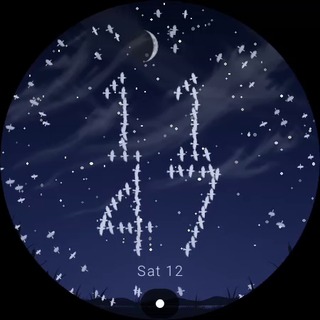
Not a video: starlings written in code fly live to spell the time on Wear OS.
Coming soon to Google Play.
A little world for your wrist
Watch the hour take flight.
Coming soon to Google Play.
Made for Wear OS
Coming soon. Compatibility details will be confirmed at release.
What makes Skywritten special
- Birds form hours above minutes and regroup at minute changes
- A circling flock and wrist-responsive parallax
- Follow the clock sky or fixed Dawn, Day, Dusk and Night styles
- Watch-supplied moon phase, optional date and system clock format
- Settled time birds on black in always-on mode
Privacy
Full privacy policy
Privacy Policy - Skywritten: Living Watch Face
Effective date: 2026-10-17
This Privacy Policy applies to 'Skywritten: Living Watch Face' (package name: 'com.pixelpond.watchface.skywritten'), developed by Pixelpond. That Google Play package has two parts: the watch face, and a small phone app, “Setup”, which has its own section below. The watch face runs only on your watch. It does not collect, store, transmit, or share any personal user data, usage analytics, location data, sensor data, or device identifiers with the developer or any third parties.
The watch face reads the following information only to render itself:
- Current system time (local clock) to set the flock's numerals and move the sky through dawn, day, dusk and night.
- The day and date, to show them when you switch Show date on.
- The current moon phase, calculated by Wear OS, to draw the moon at night.
- The tilt of your watch from its motion sensor, so the flock and the horizon lean as you move your wrist. Each reading is used for the frame on screen and is not stored.
- Your configuration selections (sky, hours and date) to render your chosen look.
- Active and ambient state transitions of your Wear OS device to switch between normal and Always-On Display (AOD) modes.
Because the watch face is built using the declarative Watch Face Format, it contains no executable code (android:hasCode="false") and requests no permissions of its own: Wear OS supplies the values above, and all rendering is handled locally on your watch by the Wear OS operating system. The watch face sends nothing to Pixelpond, and it contains no advertisements, in-app purchases, analytics or crash reporting.
Phone Setup app. Everything above describes the watch face. The same Google Play package also installs a small phone app, “Setup”, that helps you install and apply the face, and Setup does use the internet. It has no ads, no analytics or crash reporting of its own, and no Pixelpond account. Here is what it does:
- Update check. It downloads our public list of current versions from the Pixelpond website. The request carries no account, settings or watch details. Like any web request, it shows our host (Vercel) your IP address and standard request details, which include your Android version and phone model. Our host retains request records according to its configured hosting and observability settings. Request records can include your IP address, the country inferred from it, your user agent, the requested path and the response result. We use hosting records to monitor service health, diagnose problems and protect the service.
- Purchase check. From Setup version 12, Setup asks Google Play for a signed answer about whether your Google account holds this face, and sends it to our purchase checker (Google Cloud, Sydney). The checker asks Google to read it and replies “confirmed” or not. The check includes the face’s package and version, signing certificates, and Google’s app, device and licence verdicts. Google Cloud’s request logs record your IP address and standard request details; the checker’s log records the verdict and whether the check matched, for service health, diagnosis and protection against misuse. Google Cloud keeps these logs for 30 days. Our checker’s database (Neon, Sydney) keeps a one-time check code, the face’s package and version, and a hashed form of your IP address, used to limit repeated checks. The hash is not anonymisation: a known address can be matched to it. Codes expire after two minutes; later checks remove records that expired more than five minutes earlier. We also keep a daily count of checks per face, and later checks remove counts more than two UTC calendar days old. We never receive your name, email or payment details. Your phone keeps a confirmed result in memory for up to five minutes. Setup 11 and earlier do not contact this purchase checker.
- Google Play. It asks Google Play whether a newer Setup is available, and opens the face’s Play listing, on your phone or on your watch, when you tap Install or Update.
- Your watch. It uses Google Play services to find your connected watch and show its name and, if the Pixelpond app is installed, asks it which version of the face your watch has. That stays between your phone and watch and is not sent to us.
- The Pixelpond app. Setup checks whether the Pixelpond app is installed on your phone, and reads the same public list of versions to see whether the app is on Google Play. It keeps the latest answer on your phone and relies on it for up to seven days. Links it opens to pixelpond.au or to the Pixelpond app’s Play listing carry fixed tags that name this face and the button you tapped, and nothing about you or your device.
- On your phone. Setup remembers your setup step and your Less motion choice, and does not back them up. The Help email button opens a draft in your own email app; nothing is attached or sent until you send it. Where Setup shows a Privacy policy button, it opens this page in your browser.
If you have questions, contact: support@pixelpond.au
This policy may be updated. The latest version will live at the URL provided in the Google Play listing.